A small agency can lose more time to handoffs, file repairs, and inconsistent terminology than to the act of translating. Choosing a CAT tool means deciding how those jobs fit together, not just picking an editor with a familiar interface.
A computer-assisted translation tool, or CAT tool, helps a human translator work with source and target text, translation memories, terminology, and quality checks. A translation management system, or TMS, adds coordination functions such as project workflows, user roles, and vendor management. Some products combine both; others focus on a single translator’s workbench.
The right choice depends on how your agency actually works. Count the people who need access, map the path from client file to reviewed delivery, and test the formats and language resources you use. A small team doesn’t automatically need a full TMS, but a collection of individual licenses can become awkward once project managers need to assign, monitor, and review work across tools.
Start with the work, not the product category
A product page can make a CAT editor and a TMS sound like interchangeable ways to translate. They solve different problems, so start by writing down the work your team needs the software to support.
A CAT editor is where a linguist translates and reviews segments. A translation memory, or TM, stores source segments with their approved translations so the system can suggest previous work when similar text appears again. A term base stores preferred terms and can help teams apply a client’s approved vocabulary consistently.
A TMS coordinates work around that editing process. Depending on the product and plan, team-level functions can include project-manager access, linguist seats, shared resources, workflow steps, and vendor coordination. Those functions matter when an agency needs to divide work and see its status centrally. They matter less when one person handles the project from intake through delivery.
Map a real project before you compare plans
Write down the steps for a representative job:
- A client sends source files and instructions.
- A project manager checks the files, scope, language pair, and deadline.
- A linguist translates in a CAT editor.
- A reviewer checks the target text and queries.
- The project manager prepares and delivers the final files.
- The agency updates its language resources when the client approves changes.
For each step, name the person responsible and the software they use. Mark where files or information move between people. A step that depends on copying a glossary into a separate document is a real cost, even if the software subscription looks affordable.
Then identify the requirements that would stop the project. Examples include a required file format, a client-specific term base, a translator who needs browser access, or a project manager who must assign work without taking over the linguist’s editing account. Separate those must-haves from conveniences. A feature list becomes useful only when it answers a real workflow question.
The European Commission’s description of CAT procurement offers a useful principle for this exercise: the tool should work with existing systems and language resources, rather than forcing every task into an isolated editor. The Commission’s notice, published on 22 August 2018, called for a client/server application integrated with existing systems and identified documented web services and open standards as key requirements (procurement notice). Treat that notice as a historical institutional example, not a current product specification.
Decide what the project manager needs to see
A shared editor isn’t necessarily a shared workflow. Ask whether a project manager needs to assign linguists, control access, see progress, and manage client resources in one place. If the answer is yes, evaluate TMS functions directly. If the project manager can coordinate through a process your team already uses, a lighter CAT setup may be enough.
Write down how the agency handles changes, too. A client may revise terminology after translation starts, or a reviewer may return a segment for correction. The software should make the approved decision visible to the people who need it, rather than leaving the latest instruction buried in a message thread.
Compare CAT editors, TMS plans, and document tools fairly
The market includes products designed for individual linguists as well as platforms intended to coordinate teams. Compare them by job, not by brand category. The same product family can include different editions with different access models.
Public product descriptions accessed on 25 January 2026 positioned Trados Go and memoQ Translator Pro for individual translators, while memoQ TMS and Phrase’s platform described team-level seats, workflows, or vendor-management functions. Those descriptions can change, so check the live edition and plan before making a decision. The distinction is still useful: an individual editor may be a good fit for a linguist but not cover the agency’s coordination needs.
| Option | What it is meant to support | Questions for a small agency |
|---|---|---|
| Individual CAT editor | Translation and review by one linguist | How will the agency share resources and handle project assignment? |
| Team CAT environment | Shared translation work and team access | Which roles can manage projects, and which can edit? |
| TMS with CAT functions | Project coordination alongside translation | Are the included workflows useful, or more than the team needs? |
| Document-translation tool | Translation of whole documents, often with layout handling | Does it include translation memory and project management, or solve a different problem? |
Don’t assume that a browser-based tool is automatically a TMS, or that a desktop editor cannot take part in a team workflow. Check the current product description for the specific edition. For instance, product information accessed on 25 January 2026 described memoQ TMS licenses as usable through either its desktop client or browser-based memoQweb/webtrans. The relevant question isn’t simply “browser or desktop?” It’s whether the edition supports the work, roles, and access your agency needs.
Make the comparison about total fit
| Evaluation area | What to test | Why it matters |
|---|---|---|
| Access model | Linguist, reviewer, and project-manager access | A project lead shouldn’t need to borrow an editor account to coordinate work. |
| Translation memory | Create, search, export, import, and update a TM | A memory that can’t move with the agency creates dependency on one setup. |
| Terminology | Add, distribute, and review client terms | A glossary is useful only if linguists can apply it consistently. |
| Quality checks | Configure checks and inspect findings | A high count of alerts isn’t helpful if reviewers can’t tell which findings matter. |
| File support | Import and export the files clients actually send | Test tags, tables, formatting, and delivery output on representative files. |
| Workflow | Assign, review, query, and return work | A workflow should match how the team works, not add steps for their own sake. |
| Interoperability | Exchange files and connect with current systems | Open formats reduce friction when clients and linguists use different tools. |
| Cost structure | Seats, annual billing, capacity, and support | Compare the full plan cost, not an isolated price or trial offer. |
No table can replace a hands-on test. Use one finished job with an approved translation memory and terminology list. Ask a linguist to translate, a reviewer to check the result, and a project manager to follow the handoff. Note where the process stalls or requires an external workaround.
A document-translation tool can help with a different part of agency work. ChatsControl accepts DOCX and PDF documents and returns a translated Word file with formatting such as tables, headings, and lists kept in place. The tool also offers a bilingual review view, but it isn’t a full CAT tool or TMS: it doesn’t provide translation-memory leverage, segment-level project management, or team vendor workflows. For an agency weighing a document-first workflow or an AI draft for human review, ChatsControl is one option to assess alongside CAT software, not a replacement for shared CAT resources.
Treat translation memory and interoperability as operating requirements
Translation memory is one of the most important resources an agency can build. A TM stores segments and their translations as translation units. When similar text comes up again, the memory can help a linguist reuse or adapt approved work instead of translating the same wording from scratch. The European Commission explains this function on its DGT Translation Memory page.
The benefit depends on quality and access. A memory full of inconsistent, unreviewed, or client-mixed entries can create extra review work. A useful agency process defines who can add approved work, how client-specific resources stay separate, and how corrections get back into the memory.
Use TMX to test exchange, not to assume compatibility
TMX is a common format for exchanging translation memories. The European Commission’s DGT Translation Memory is distributed in TMX; its page says the header identifies TMX 1.1 for backward compatibility and that the files also comply with TMX 1.4b. The Commission describes the resource as parallel legislative texts in 24 EU official languages, with aligned translation units (DGT Translation Memory).
“The documents are in the widely used Translation Memory eXchange (TMX) format.”
That statement describes a format for exchanging TM data, not a promise that every tool will preserve every field or behave the same way after import. Treat TMX as a portability route to test. Export a sample, import it into the tool you’re considering, and inspect whether the source and target segments, language information, and useful context remain available.
A practical portability test includes three checks:
- Export a small memory from the system your agency already uses.
- Import the file into the proposed tool and check the results with a linguist.
- Export it again and confirm that the receiving system can read it.
Test more than whether the import completes. Confirm that the memory contains the expected languages and content, then try a real search in a CAT editor. If the workflow depends on a particular client or project resource, include a sample of that resource. A successful upload isn’t proof that the memory will be useful in day-to-day translation.
Keep client resources separate and governed
A TM isn’t just a convenient lookup table. It can contain client-approved wording, repeated source material, and decisions that need a clear owner. Before loading resources into a shared space, decide which clients’ content can be reused and which resources must remain isolated. Your team should be able to identify the source and purpose of an entry when a reviewer questions it.
Terminology needs similar care. A term base should tell linguists which term to use, where it applies, and whether a client has approved it. If the same term appears with different meanings across subject areas, a flat list can mislead. Include enough context to help the translator choose the right equivalent.
The European Commission’s DGT resource is a public corpus of parallel legislative text, not a substitute for your agency’s client-approved TM. Its value for this discussion is that it demonstrates an aligned multilingual resource and an exchange format. Don’t treat a general corpus as permission to reuse any text for a client’s project.
Test files and quality checks with the people who use them
A CAT tool can appear smooth on a short demonstration file and become troublesome on a real client delivery. File handling deserves a structured test because the software has to preserve meaning, tags, structure, and reviewability across import and export.
Take a representative file from the work your agency actually handles. Include the elements that tend to be fragile: tables, links, numbering, repeated segments, placeholders, and formatting that matters to the client. Run the file through the product, translate it, export it, and compare the delivery against the source. Ask the linguist and the project manager to inspect the result separately. A linguist may notice a segment or tag problem that a project manager won’t see, while a project manager may catch a delivery or handoff issue that isn’t visible in the editor.
Check the mechanism behind file conversion
A CAT tool doesn’t simply place a translated sentence over a source file. The software has to extract text and structural information, make text available for translation, then generate an output file that follows the source format. A mismatch at any point can lead to broken tags, misplaced content, or missing structure.
The Commission’s 2018 procurement notice described a CAT application that would interact with server applications storing and reusing language resources. The notice also highlighted documented web services and open standards as requirements. Those points are relevant to a small agency because a file workflow rarely exists on its own: it may need to connect with existing resources or pass work between people and systems (European Commission notice).
A PDF needs particular attention. A text PDF doesn’t hold paragraphs and tables as editable objects in the same way as a DOCX. The page represents text positioned at coordinates, so conversion must reconstruct structure before a translator can work on it. If the reconstruction joins separate text blocks or splits a word into multiple fragments, the CAT editor may show a source that is awkward to translate and difficult to deliver cleanly.
Scans are a different challenge because the page is an image rather than selectable text. Optical character recognition, or OCR, must first identify the words. Stamps, checkboxes, signatures, and degraded print can be harder to process than clean, printed text. Keep a human check in the workflow when a mistake in a form field, amount, or name could affect the delivery.
A PDF converter can create CAT problems before translation starts
I hear DTP specialists and CAT tool users name the same three problems in PDF-to-InDesign conversion: text frames that aren’t threaded, junk paragraph styles, and runs split in the middle of words. Every split becomes a tag in the CAT tool. I check every version of our converter in real InDesign 2021, 2022, 2024, 2025, and 2026.
The practical lesson is to inspect the converted file before translation, not only the final PDF or InDesign export. A file can look acceptable on a page while presenting fragmented text and unnecessary tags in the CAT editor. Test whether text frames flow in the intended order, whether paragraph styles are usable, and whether words remain intact as segments.
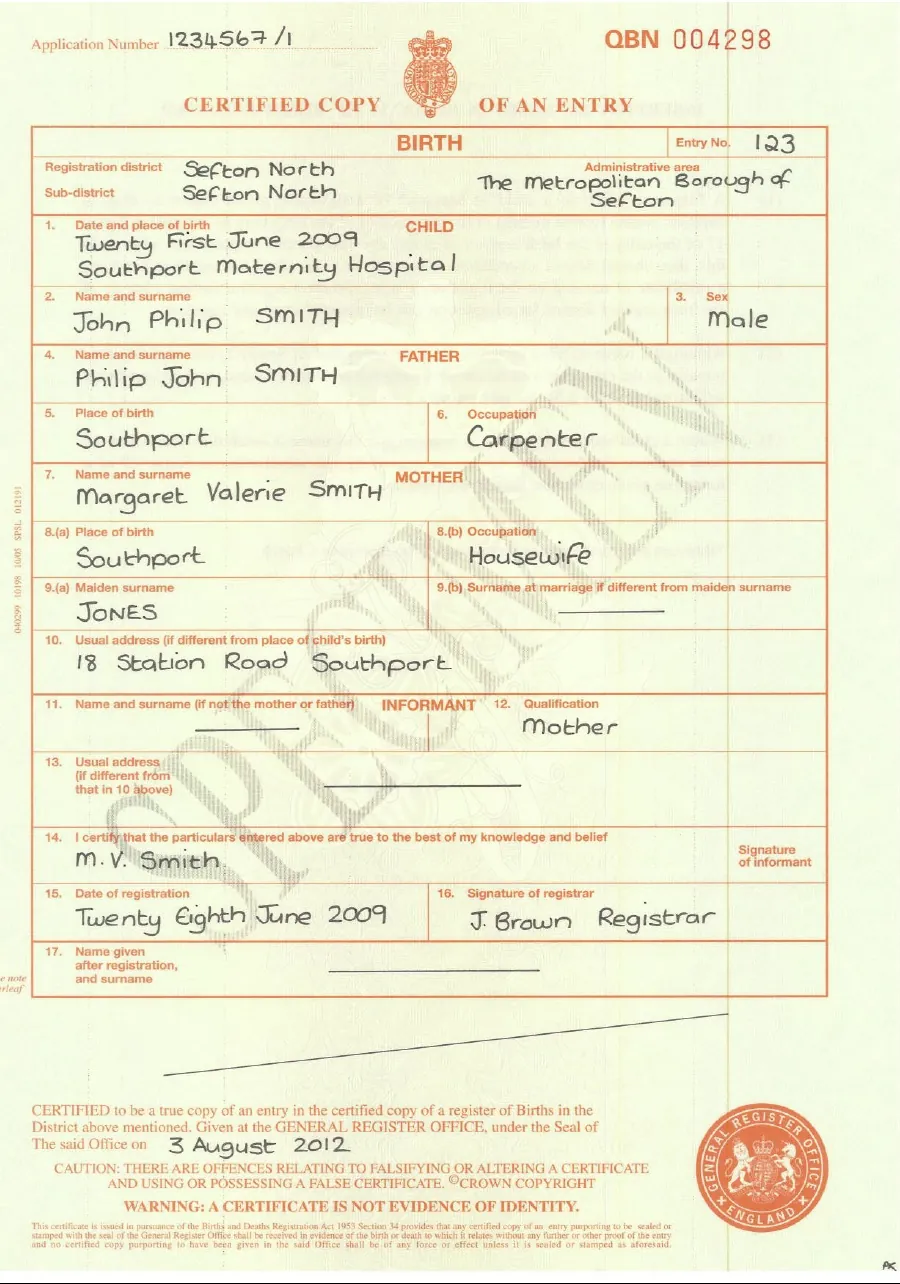
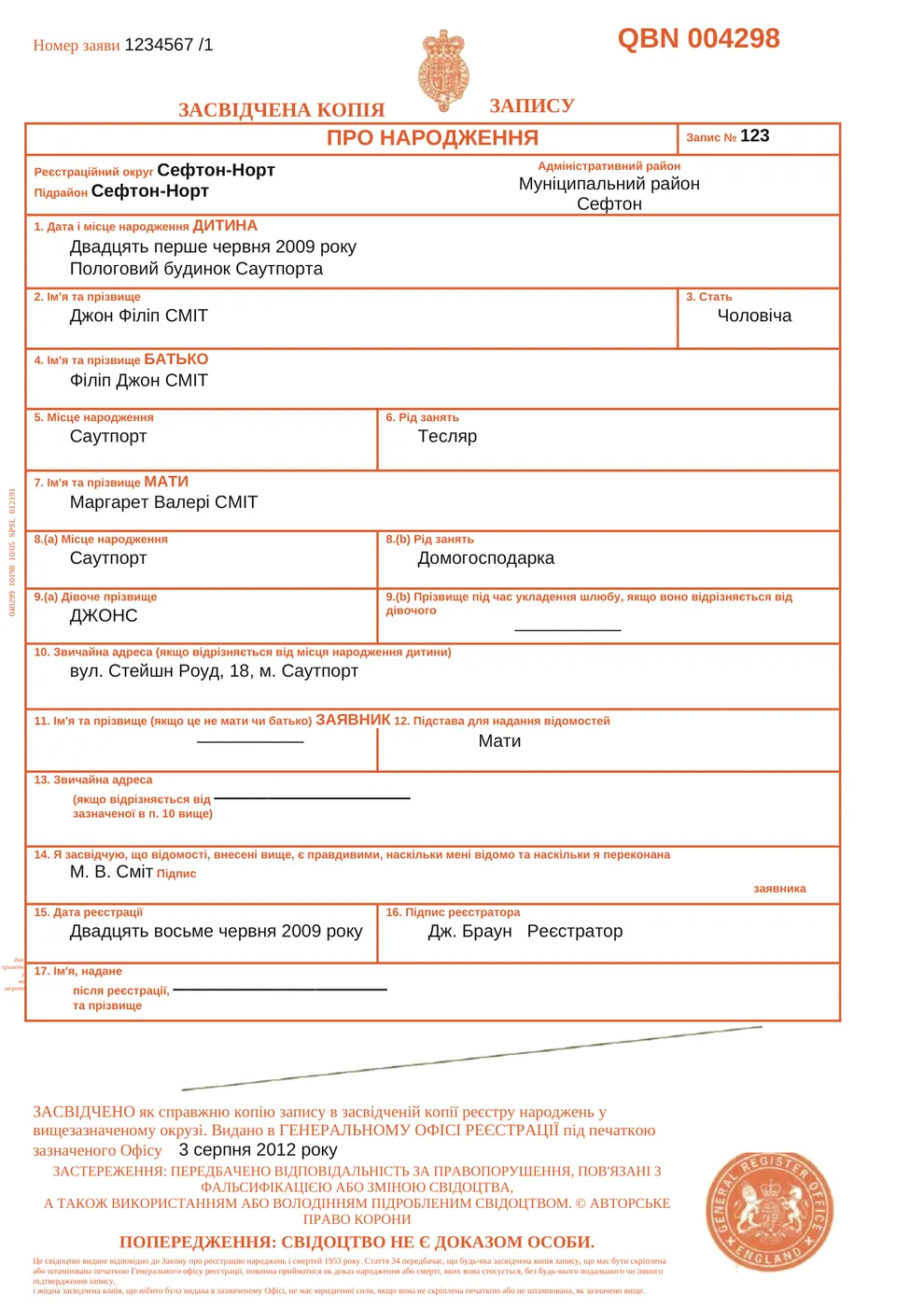
A 6-page US insurance claim form full of frames and checkboxes gave me a clear example of why layout matters. When converted from its text layer, the words came out exact but every frame and box was lost; when built from the scan, every frame and box was there. For forms, the layout is half the document, and a translator who has to redraw it loses more time than the translation takes.
A CAT editor still needs a suitable source to work from. The example isn’t a reason to choose scan conversion for every file; it shows why an agency should compare the text layer and page structure when a form’s layout carries meaning. Test a real form before agreeing on a process for converting and returning that type of file.
ChatsControl addresses a related document problem rather than replacing the CAT editor. When a user uploads a DOCX or PDF, the service returns a translated Word document while retaining layout elements such as tables and headings; a scan or photo is read before the formatted document is rebuilt. That can help when layout is central to a document, but handwriting and very degraded scans remain unreliable. Keep a human review step for those cases.
Calculate the real cost of team access
Software cost isn’t just the line item on a pricing page. A small agency should compare seats, billing terms, capacity limits, support, and the work required to keep resources current. A plan that looks inexpensive per user may not cover the roles the agency needs. A plan with more included capacity may still be a poor fit if the team won’t use its workflow features.
Public pricing and plan details accessed on 25 January 2026 illustrated why product editions need careful comparison. One TMS plan listed a Starter level from €2,750 billed annually, while other levels required a sales conversation; those terms can change, so check the live pricing page before making a decision. Another platform described a capacity-based team plan, but the fetched pricing text did not expose its amount. An absent amount isn’t a basis for a budget estimate.
Use this worksheet to compare current offers:
| Cost item | Questions to answer |
|---|---|
| Linguist access | Does every translator need a paid seat, or can access be assigned per project? |
| Project-manager access | Is the person coordinating work included, or billed separately? |
| Reviewer access | Can reviewers check work without receiving full editing access? |
| Billing period | Is the displayed amount monthly or annual, and can the team change plans? |
| Capacity | Are limits based on words, projects, users, or another measure? |
| Support | What support is included, and does the team need a paid service level? |
| Migration | How much work will it take to import TMs, terminology, and active projects? |
| Exit | Can the agency export its memories and project data in a format it can use elsewhere? |
Write down the assumptions beside each quote. Note the date you checked it, the number and type of users included, the billing period, and the capacity. A price without those details can’t support a meaningful comparison.
Compare team cost with the cost of workarounds
The cheapest license may still create extra work if the agency has to pass files manually, maintain separate glossaries, or coordinate review outside the software. The opposite can happen too: a large TMS plan may include functions the agency doesn’t use. Compare the cost of the plan with the work it removes from the process, not with a competitor’s headline price alone.
Avoid estimating savings from fuzzy word-reuse assumptions. Use your own project records to see how often prior translations are genuinely reusable and how much time the team spends cleaning or reviewing matches. If those records don’t exist yet, run a pilot and record the work. A specific, observed workflow is more useful than a general claim about productivity.
ChatsControl uses a different pricing model from a seat-based CAT tool. The current product reference lists a free tier of 6,000 characters at sign-up, then a monthly top-up to 1,000 characters for unused balance, and pay-as-you-go pricing of $1.50 per 1,000 characters; scanned pages are billed at the same rate, with a minimum of 1,000 characters per page. Those figures describe document translation, not shared CAT or TMS access. Check the service for the current terms before using the figures in a budget.
Run a pilot before moving the whole agency
A pilot should test the handoffs that make a tool valuable or frustrating. Choose one project with a real brief, a translation memory, a term list, and a file format your team handles often. Include the people who would use the product in the normal workflow, not only the person who selected it.
Step 1: Choose a representative project
Pick a project that reflects routine work and includes at least one challenge your agency needs the software to handle. That could be a complex document, a shared term base, a review handoff, or a client resource that needs careful separation. Don’t choose a polished sample file that avoids the team’s actual pain points.
Step 2: Import a translation memory and terminology
Use a copy of a real resource, with client permission and the right access controls. Check that the tool can import it, retrieve useful matches, and show the terms your linguists need. Export it again if portability is important to your workflow.
Step 3: Assign the work using the intended roles
Have the project manager create or assign the work, then have a linguist translate and a reviewer check it. Avoid giving everyone the same permissions just to make the pilot easier. The pilot should reveal whether roles and access match your real process.
Step 4: Run quality checks and resolve findings
Review the alerts the tool raises. Check whether they point to genuine issues, whether a linguist can resolve them clearly, and whether the reviewer can see what changed. A useful quality process makes errors easier to catch without turning every warning into noise.
Step 5: Export and inspect the delivered file
Compare the output with the source and check structure, tags, tables, links, and formatting. Ask the person responsible for delivery to inspect the file in the format the client will receive. A successful CAT-editor session doesn’t prove that the final deliverable is sound.
Step 6: Record friction and decide
Write down where users had to leave the tool, repeat an action, or ask another person for help. Compare that list with the requirements you wrote at the start. Keep the pilot small until the team can explain what the new setup solves and what remains outside it.
The Commission’s resources for language professionals provide an official starting point for language-technology resources. Product trials and current plan pages can show what a vendor offers, but only your own pilot can show whether the workflow fits your agency.
Watch for the problems that make a small setup expensive
A small agency can buy more software than it needs or choose too little structure for the work it has. The common mistakes are often visible during a pilot, but only if the team tests the full process instead of clicking through a product demo.
Buying a TMS before defining the workflow
A team plan doesn’t fix unclear responsibility. If no one knows who approves a term, who updates the TM, or who resolves a reviewer query, software won’t make those decisions on the agency’s behalf. Define the process first, then check whether the product supports it.
Choosing an individual license for a team problem
A CAT editor for an individual can be perfectly suitable for a linguist. The problem starts when project managers need team functions the edition doesn’t include. Confirm who needs to create projects, assign work, and manage resources before counting seats.
Treating TMX as a complete migration plan
A TMX file can help move translation units between tools, but a successful import doesn’t guarantee that every detail transfers as expected. Test the actual memory and inspect the imported result. Keep a copy of the original resource until the team has verified the migration.
Ignoring file structure because the text looks right
Exact words don’t prove that a document is ready to deliver. Forms, frames, checkboxes, and tags can matter as much as the text. The US insurance form example showed that the text layer could preserve words while losing every frame and box. Test layout and editable structure alongside language quality.
Confusing document translation with CAT collaboration
A tool that handles whole documents and preserves formatting can support a different part of an agency’s work from a CAT editor. ChatsControl includes document translation and bilingual review, but it doesn’t give teams translation-memory leverage or TMS project management. Use it where document handling is the problem; don’t select it as a substitute for features it doesn’t provide.
Letting resources lose their owner
Translation memories and term bases need a clear maintenance process. Decide who can change approved content, how corrections are reviewed, and which projects can use each resource. Without those decisions, a shared resource can spread inconsistent terminology as quickly as it spreads good decisions.
FAQ
What is the best CAT tool for a small translation agency?
The best fit depends on whether your agency needs a CAT editor for linguists, shared resources, or a TMS for coordinating projects and vendors. Test a real job with your team and compare access, file handling, TMX exchange, terminology, quality checks, and the full plan cost.
How much does CAT software cost for a small translation agency?
There isn’t one useful price for every agency because plans can differ by seats, capacity, billing period, and included functions. Check current plan details directly and calculate the cost for project managers, linguists, and reviewers who need access.
Should a small agency choose a CAT tool or a translation management system?
Choose a CAT tool when translation and review are the main needs and the agency already has a workable way to coordinate projects. Choose a TMS when your team needs centralized project management, role-based access, or vendor workflows as part of the same setup.
Can translators using different CAT tools share translation memories?
Translators can exchange translation memories using TMX, a widely used format described by the European Commission’s DGT Translation Memory page. Test the import and export with your actual resources because exchange doesn’t guarantee identical behavior across products.
What features should a small translation agency look for in CAT software?
Start with translation-memory exchange, terminology support, quality checks, role and access controls, file-format handling, and a review workflow your team can follow. Test those functions on a representative job instead of relying only on a product demonstration.
Can ChatsControl replace a CAT tool for an agency?
No. ChatsControl translates whole DOCX and PDF documents and offers bilingual review and quality checks, but it doesn’t provide translation-memory leverage, segment-level project management, or team vendor workflows. It can be assessed as a document-translation option alongside a CAT setup.
How can an agency check whether a CAT tool will work with existing translation memories?
Export a sample memory from your current system, import it into the candidate tool, and inspect the segments and language information with a linguist. Export the result again and check whether your existing system can read it.
What should a small agency test before switching CAT tools?
Test one representative project from intake through delivery, including TM and terminology import, role assignments, translation, review, quality checks, and file export. Record workarounds and file problems, then compare them with the agency’s requirements before moving all active projects.